Gerir os cookies que são utilizados para publicidade, como a personalização de anúncios, o remarketing e a análise de desempenho de anúncios.
2.8.7. Change PHP version for console
Attention!
Changing the PHP version for console does not affect the PHP version of the site. For the site, use the instruction Change PHP version for site.Current version
Command to see the current version of PHP:
php -vChange version
Control panel
Affects all new connections via SSH.
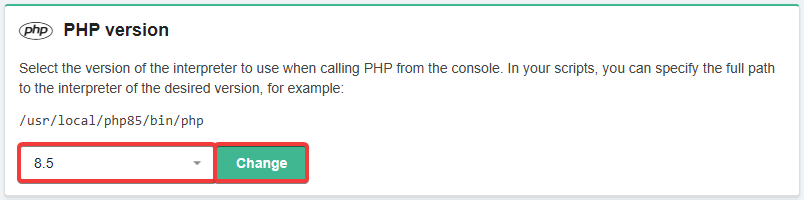
- Open the "Hosting account settings" section (or "Hosting → Hosting account settings").
- In the "PHP version" block, select the desired version and click "Change":
- Run the command
source ~/.bashrcor. ~/.bashrcor simply reconnect via SSH.
Interpreter
Affects only commands that are run with a specific interpreter specified.
When running commands, explicitly specify the path to the PHP interpreter of the desired version:
/usr/local/php52/bin/php
/usr/local/php53/bin/php
/usr/local/php54/bin/php
/usr/local/php55/bin/php
/usr/local/php56/bin/php
/usr/local/php70/bin/php
/usr/local/php71/bin/php
/usr/local/php72/bin/php
/usr/local/php73/bin/php
/usr/local/php74/bin/php
/usr/local/php80/bin/php
/usr/local/php81/bin/php
/usr/local/php82/bin/php
/usr/local/php83/bin/php
/usr/local/php84/bin/php
/usr/local/php85/bin/php
Either use shortened links like /usr/bin/php8.5 or just php8.5 (instead of 8.5 specify the desired version).
Alias
Attention!
To work with Composer, use version changing via the control panel or PATH. Aliases are also not suitable for use in PHP scripts, Bash scripts, cron and Supervisor — in these cases, you must specify the absolute path to the interpreter of the required PHP version.- Open the "Hosting account settings" section (or "Hosting → Hosting account settings").
- In the "Aliases" section, specify
phpin the "Alias" field, specify/usr/local/php85/bin/phpin the "Command" field (replacephp85with the version you need), and click "Change":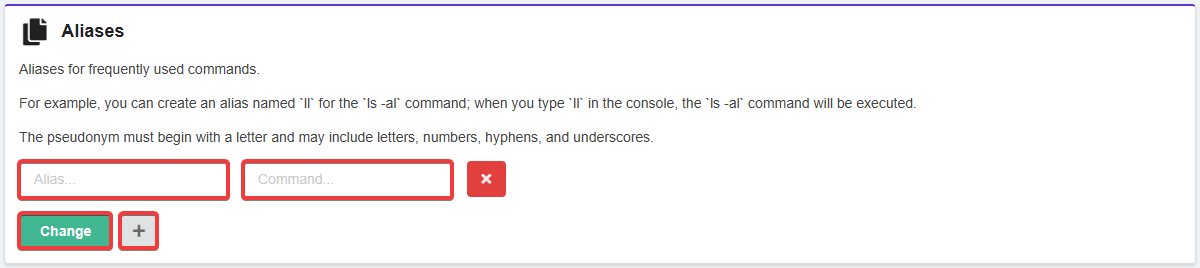
- Run the command
source ~/.bashrcor. ~/.bashrcor simply reconnect via SSH.
PATH
Only affects the current SSH connection. To make the version apply to new connections, use the version changing via the control panel.
Redefine the PATH variable with the command (instead of php85, specify the desired version):
export PATH=/usr/local/php85/bin:$PATH
(3)