Gerir os cookies que são utilizados para publicidade, como a personalização de anúncios, o remarketing e a análise de desempenho de anúncios.
2.5.1.10. View properties
To view the properties of a file or directory using file manager, select the file or directory whose properties you want to view, right-click on it, and select "Properties" in the context menu: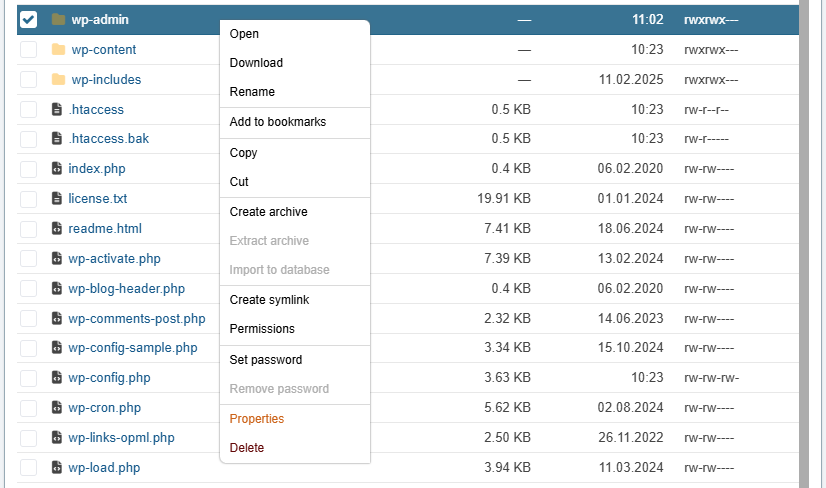
Properties opens in a window: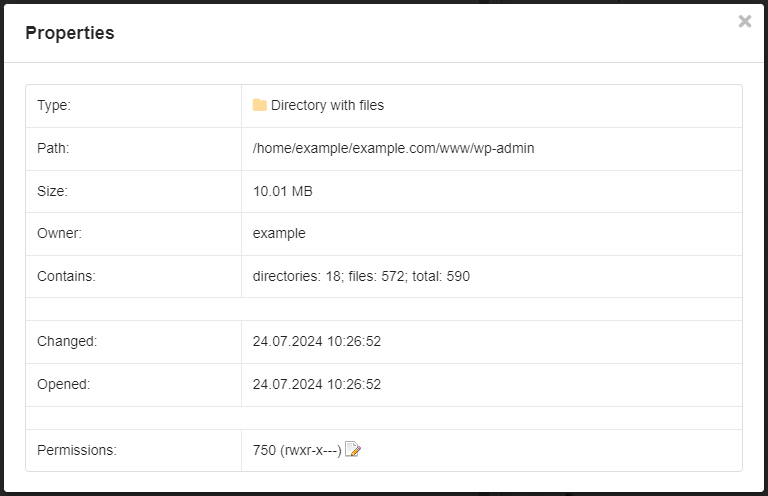
- "Type" — type of element: file or directory.
- "Path" — absolute path to the file or directory.
- "Size" — file size or total size of the directory contents.
- "Owner" — name of hosting account where the file or directory is located.
- "Contains" (for directories only) — number of files, subdirectories and total number of items contained in this directory.
- "Changed" — date and time of the last modification of the file or directory.
- "Opened" — date and time of file or directory creation.
- "Permissions" — current permissions in numeric and symbolic form, as well as the button to change them.