Gerir os cookies que são utilizados para publicidade, como a personalização de anúncios, o remarketing e a análise de desempenho de anúncios.
4.3.2.4. Search for emails in WebMail classic
In WebMail classic full-text indexed email search is implemented, which makes search much faster and more convenient.
Search placement in interface depends on selected theme. In the following themes, search is placed directly in message list: "Droid+", "Elastic", "GMail+", "Outlook+".
The selected parameter opens additional search settings: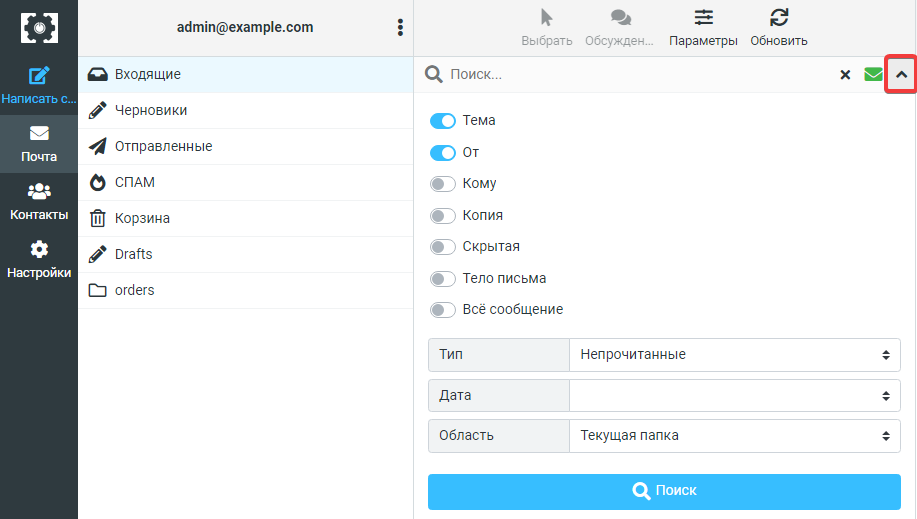
In other themes, search is placed in the upper-right corner of the window, and the selected button opens additional search settings: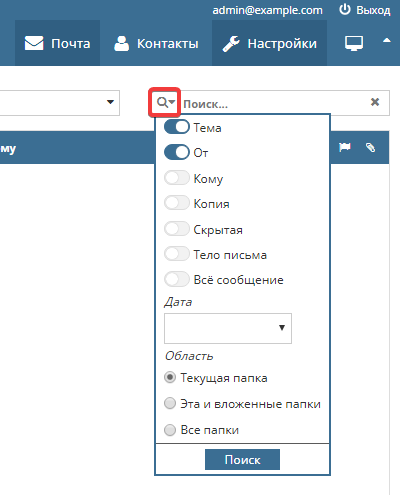
In search parameters, you can configure more flexible settings, which allows searching only by specific criteria:
- "Subject" — search by email subject (by
Subjectheader content). - "From" — search by sender (by
Fromheader content). - "To" — search by recipient (by
Toheader content). - "Copy" — search by recipients specified as copies (by
Ccheader content). - "Hidden" — search by hidden recipients (by
Bccheader content). - "Email body" — search by email content.
- "Entire message" — search across all available criteria.
- "Type" — email status. You can select the following type:
- Unread.
- Flagged.
- Unanswered.
- Deleted.
- Not deleted.
- With attachment.
- Priority:
- Highest.
- High.
- Normal.
- Low.
- Lower.
- "Date" — email receipt period. You can specify "less than a week", "less than a year", "more than a month", etc.
- "Area" — folder selection where search will be performed.