Gerir os cookies que são utilizados para publicidade, como a personalização de anúncios, o remarketing e a análise de desempenho de anúncios.
4.2.11. Copy mailbox filters
Attention!
For corporate mail only.Filters allow you to set rules for automatically processing incoming mail. They can be configured individually for each mailbox via the WebMail.Online or WebMail classic interface.
By copying filters, you can copy an existing set of filters from one mailbox to other mailboxes within the same mail domain. This way, you don't have to manually configure the same set of filters separately for each mailbox; you simply need to configure them in one mailbox and copy them to the others.
To copy filters, open the "Mailboxes" section and in the mailbox menu, click "Copy filters":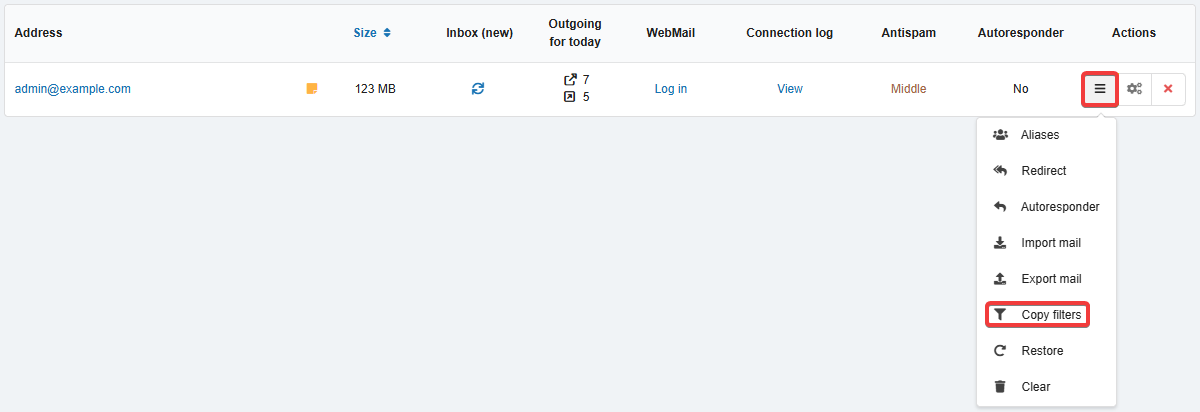
In the copy form, select an existing filter set and the mailboxes to which you want to copy it, then click "Copy":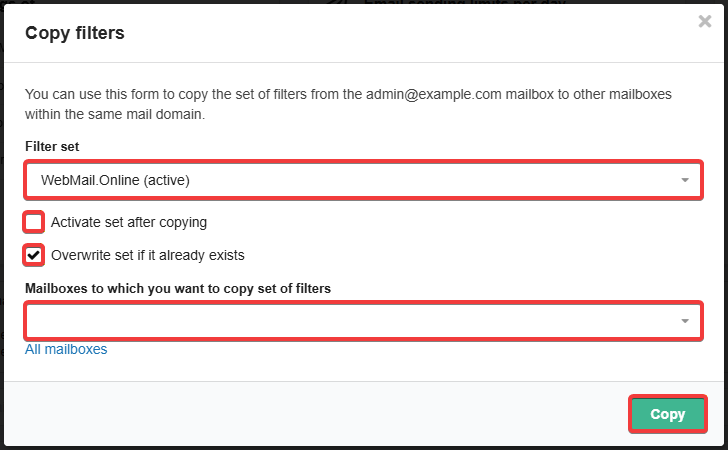
The "Activate set after copying" option immediately activates the copied filter set in the destination mailbox and deactivates all other sets.
The "Overwrite set if it already exists" option determines whether an existing filter set with the same name in the destination mailbox will be overwritten. If the option is enabled, the set will be overwritten; if it is disabled — a message will appear stating that the set already exists and the copy operation was not performed.